It's 5:55 AM. You're sitting at your laptop with four browser tabs open, ready to book ADRs for three different families the moment the clock hits 6:00 AM Eastern. You have a spreadsheet on your second monitor with everyone's dining preferences, dietary restrictions, and party sizes. Your phone is buzzing with a text from one of the moms who just remembered her son is allergic to peanuts.
Welcome to ADR day.
If you're a Disney travel agent, you know exactly what this feels like. Dining reservations are one of the most time-consuming, high-stakes parts of the job — and most agents are still managing them with spreadsheets, sticky notes, and sheer willpower.
There's a better way.
Why Disney Dining Reservations Are So Hard
Disney dining reservations — officially called Advanced Dining Reservations, or ADRs — open at 6:00 AM Eastern, exactly 60 days before your check-in date. For on-site resort guests, the 60-day window covers your entire stay. Off-site guests get a rolling 60-day window, one day at a time.
The popular restaurants book up in minutes. Be Our Guest. Cinderella's Royal Table. 'Ohana. Topolino's Terrace. Space 220. If you're not refreshing at 5:59:58, you're already behind. And every family has specific needs — allergies, character meal preferences, signature dining requests, mobility considerations, birthday celebrations, party sizes that changed three times since they booked.
Now multiply that by ten. Because you're not booking for one family. You're booking for ten families with ten different rolling 60-day windows, ten different sets of preferences, and ten different expectations about how quickly you'll get their Be Our Guest reservation confirmed. That's the actual job.
The Old Way: Spreadsheets and Chaos
Here's what most Disney agents are doing right now. A Google Sheet with columns for client name, restaurant, date, time, party size, confirmation number, dietary needs, notes, and status. Maybe a separate tab for each client. Maybe a Google Calendar with reminders for when each ADR window opens. Text messages from clients scattered across three different conversations. Email confirmations from Disney that you have to manually copy into the spreadsheet.
It works — until it doesn't. And it stops working faster than you think.
A client changes their mind about Cinderella’s Royal Table the night before their ADR window opens. You scramble to update your sheet and reprioritize restaurants.
A reservation gets cancelled and you forget to remove it from the spreadsheet. The client shows up at the restaurant and there’s no table.
You’re managing 10 trips at once and you miss an ADR window because the reminder was buried under 40 other calendar notifications.
A family adds a member two weeks before the trip. Now every reservation needs to be modified or rebooked for a larger party size.
You can’t find a confirmation number when a client texts you from the park. You’re scrolling through a spreadsheet on your phone, squinting at tiny text, while they’re standing in front of the restaurant.
This isn't a workflow. It's a stress factory. And the worst part is that dining reservations are one of the things clients judge you on the hardest. Nail the dining and you're a hero. Miss one reservation and they remember it forever.
The Better Way: A Real Dining Tracking System
Here's what a proper dining management system looks like — whether you build it yourself or use a tool that does it for you.
One source of truth
Not a spreadsheet. Not text messages. Not email confirmations. One system where every dining reservation lives, organized by client and trip. When something changes, you update it in one place and it’s updated everywhere.
Linked to the client and the booking
Each reservation is tied to a specific client and a specific trip. When you pull up the trip, you see all the dining. When you pull up the client, you see all their preferences across every trip they’ve taken with you. “The Johnsons loved ‘Ohana last year” is knowledge you should have at your fingertips, not buried in old emails.
Tracks everything that matters
Restaurant name. Date and time. Party size. Confirmation number. Dietary restrictions and allergies. Special requests — high chairs, celebrations, mobility needs, preferred seating. Status: confirmed, waitlisted, cancelled, modified. If it affects the reservation, it should be in the system.
Reminds you when ADR windows open
60 days before each client’s check-in, you get a notification. No more setting calendar reminders manually for every single trip. No more missing a window because you forgot.
Clients see it on their own app
They don’t have to text you asking “What time is our Cinderella dinner?” They open their app and see it. Restaurant name, time, any notes you’ve added. One less text for you, one more moment where your client feels like they hired a professional.
Accessible from your phone
A client texts you while they’re in line for Space Mountain asking what restaurant they’re going to tonight. You pull it up in five seconds. From your phone. Not from a laptop you don’t have with you.
How Pixie Dust CRM Handles Dining Reservations
Pixie Dust CRM has a built-in dining reservation tracker. It's not a workaround. It's not a custom field hack. It's a dedicated dining management system designed specifically for Disney travel agents.
Open the More menu on your phone, tap Dining, and you see all upcoming dining reservations across all your clients, sorted by date. Each reservation shows the client name, restaurant, date, time, party size, and status. Tap any reservation to see full details including confirmation number, dietary notes, and special requests.
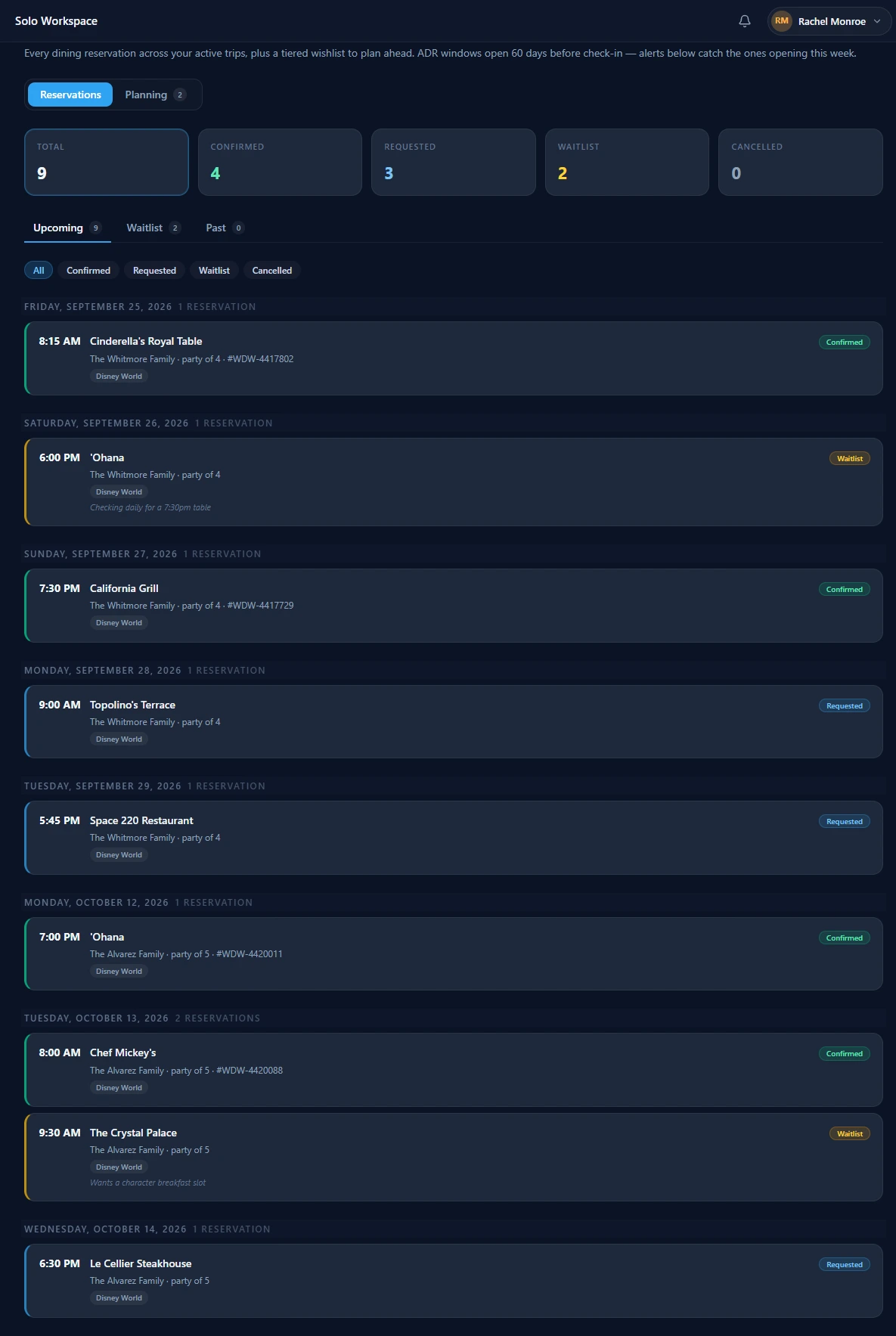
The Reservations tab: every ADR across every active trip, grouped by date, with confirmation numbers on the ones that landed and honest status on the ones that haven't — down to a waitlist note reading “checking daily for a 7:30pm table.”
The Planning tab lets you prep for ADR day before it happens. Pick a client and booking and you get their wishlist already sorted into three tiers — Must-do (book the moment the window opens), Would love (strong second choices), and If there's room (nice-to-have backups) — with the dining notes sitting right underneath. When the 6:00 AM alarm goes off you are not deciding anything. You are working a list.
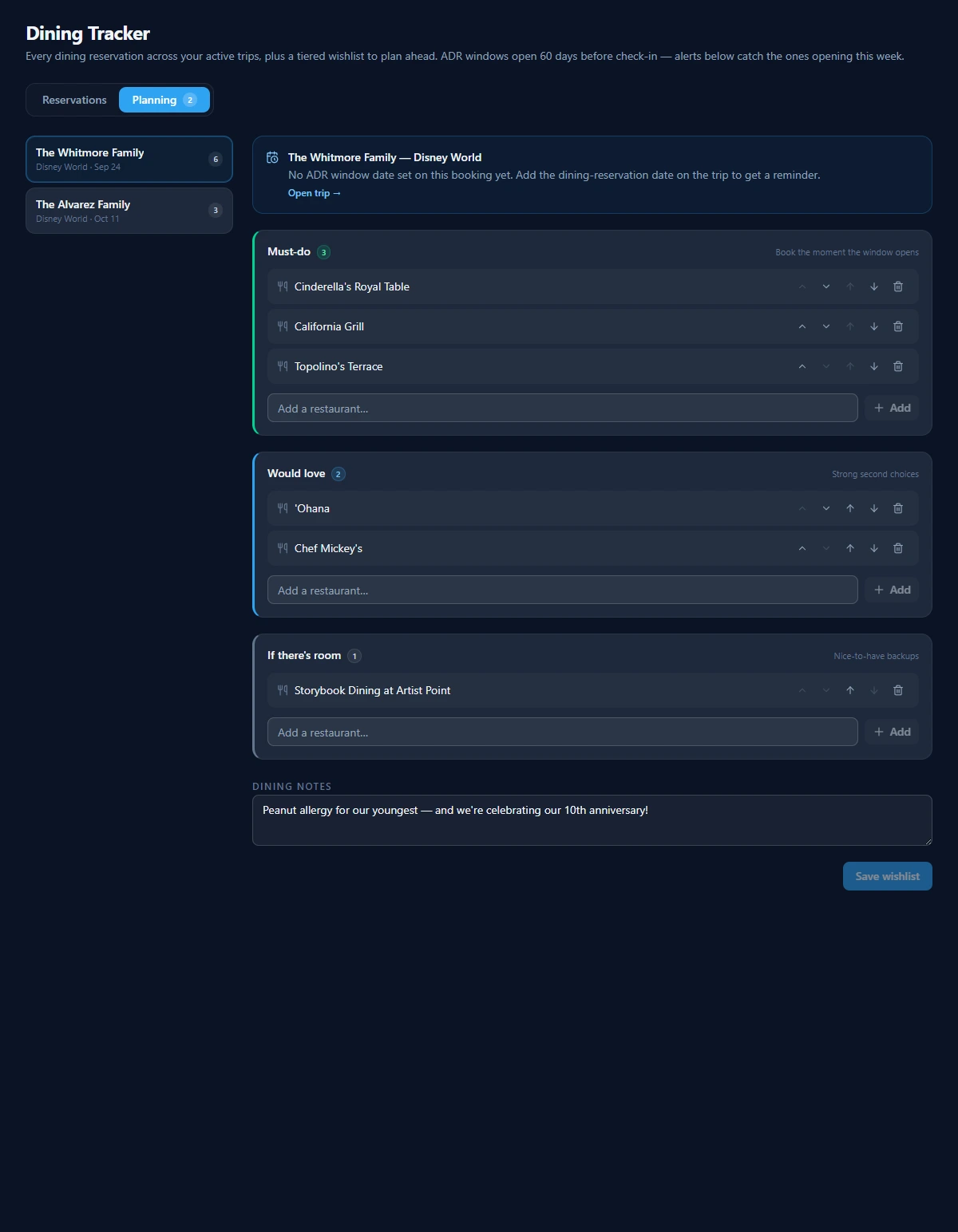
The Planning tab. The ranking is the client's — they set it in their app — and the notes travel with it, so the peanut allergy and the anniversary are in front of you while you are on hold with the reservation line.
When a reservation is booked, add it from the client's booking page. It shows up in the dining tracker, on the client's trip timeline, and in their client app automatically. One entry, visible everywhere it needs to be.
No other travel agent CRM has this. Tern, TravelJoy, Travefy, and VacationCRM expect you to track dining yourself — in a spreadsheet, a notes app, or custom fields that weren't designed for this. Pixie Dust CRM treats dining as a first-class feature because that's how important it is to your clients.
5 Practical Tips for ADR Day
Whether you use Pixie Dust CRM or any other system, here are five things that will make ADR morning less painful:
1.Pre-load client preferences the day before
Don’t wait until 5:50 AM to figure out which restaurants each family wants. Have your priority list ready the night before — first choice, second choice, backup. Know the party sizes, the allergies, and the special requests before you’re speed-clicking at 6:00 AM.
2.Use multiple browser tabs on a desktop with a wired connection
One tab per family. Desktop, not phone — the Disney site loads faster on a real browser. Wired ethernet if you have it. WiFi drops at the worst possible moment.
3.Have backup restaurant choices ready
Be Our Guest is gone in 90 seconds? Move immediately to your Tier 2 list. Don’t sit there refreshing for 10 minutes hoping a table appears. Book your backups first, then check back for cancellations later.
4.Send confirmations to clients within an hour
The faster you confirm, the more competent you look. “Hi Sarah! Great news — I got ‘Ohana for Thursday at 8:05 AM and Be Our Guest for Saturday at 5:20 PM. Cinderella’s Royal Table was full but I’m watching for cancellations.” That message takes 30 seconds and buys you massive trust.
5.Track everything in your CRM, not your head
Even the small stuff. The high chair request. The nut allergy. The fact that this is their anniversary dinner. You will forget it in three weeks when you’re managing 15 other trips. Your CRM won’t.
Stop managing Disney dining in spreadsheets
Try Pixie Dust CRM free for 30 days. The only travel agent CRM with a built-in dining reservation tracker. No credit card required.
Start Your Free TrialRelated
Frequently Asked Questions
When do Disney dining reservations open?
Disney dining reservations (ADRs) open at 6:00 AM Eastern, 60 days before your check-in date. For resort guests, the 60-day window applies to your entire stay — so if you check in on June 15 for a 7-night trip, you can book dining for June 15–22 all on the same morning. Off-site guests book on a rolling 60-day basis, one day at a time.
How early should travel agents book Disney dining?
The moment the ADR window opens at 6:00 AM Eastern. Popular restaurants like Be Our Guest, Cinderella’s Royal Table, ‘Ohana, and Topolino’s Terrace can book up within minutes. Have your client’s preferences loaded and ready the night before so you’re not scrambling at 5:55 AM.
What’s the best way to track Disney dining for multiple clients?
Use a system that links each reservation to the specific client and booking, tracks confirmation numbers, dietary restrictions, and special requests, and is accessible from your phone. A spreadsheet works for 2–3 clients but falls apart at scale. Pixie Dust CRM has a built-in dining tracker designed for this.
Does Pixie Dust CRM have a Disney dining tracker?
Yes. Pixie Dust CRM is the only travel agent CRM with a built-in dining reservation tracker. You can see all upcoming reservations across all clients, add reservations from the booking page, track confirmation numbers and dietary needs, and get notified when ADR windows open. It works on both the web app and the mobile app.
Can my clients see their dining reservations on their phone?
Yes. Pixie Dust CRM includes a free client app where your travelers can see their full trip details, including dining reservations, dates, times, and any notes you’ve added. They don’t need to text you asking “What time is our dinner?” — it’s right there in their app.