Bookings & Pipeline
From Inquiry to Bon Voyage — Track Every Step
Bookings are the heartbeat of your business. You need a system that keeps pace with how you actually work — not a spreadsheet that falls apart the moment you have more than ten trips open.
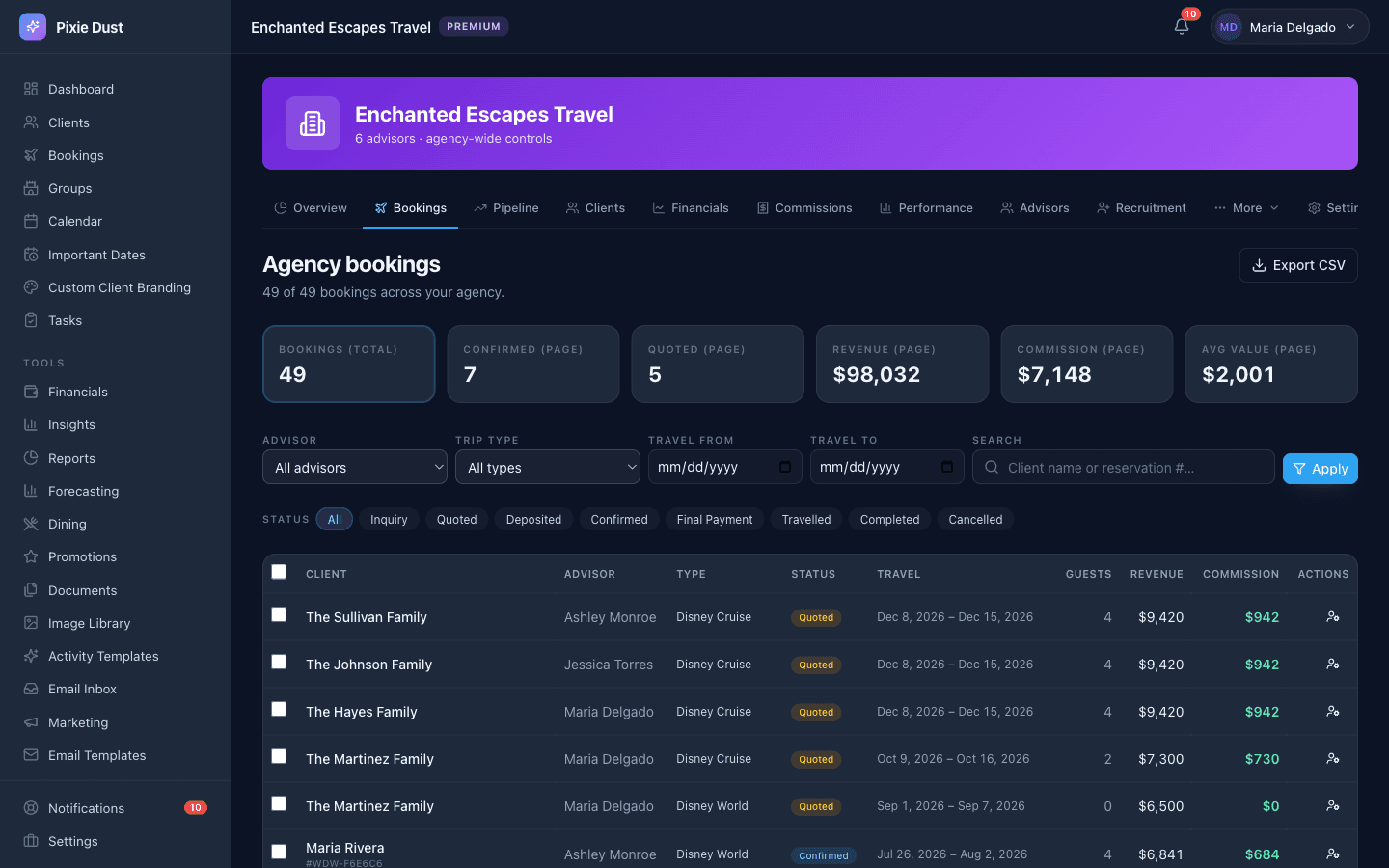
Filter by status, travel date, or trip type — every booking in one place.
Built for the Way You Actually Book
Generic CRMs give you a blank form and wish you luck. Pixie Dust CRM gives you a multi-step booking form that already knows what a Disney travel agent needs to capture.
Client info, destination type, travel dates, every traveler with names and ages — it's all there from step one. No copy-pasting from emails. No sticky-note reminders. Just a clean flow that walks you through the booking the same way you'd walk a client through their trip.
Destination Types
Disney World, Disneyland, Universal, Disney Cruise Line, Carnival, Royal Caribbean, or Combined trips.
Resort & Accommodation
Room type, resort property, and a Disney resort toggle so the right fields show at the right time.
Tickets & Experiences
Tickets per person, park days, Lightning Lane add-ons, and Memory Maker — all captured in one place.
Dining
Dining plan selection and dining reservations tracked per booking so nothing slips through the cracks.
Travelers
Add every traveler with their name and age. No more counting heads from an email thread.
Pricing & Deposits
Record total price and deposit amounts right on the booking. You always know where the money stands.
This isn't a generic form with a “notes” field. It was designed by someone who has watched agents juggle ten browser tabs just to build a single booking. You deserve better than that.
Quotes That Close Deals
Not every inquiry is ready to book. Sometimes a client just wants to see what it would cost. Pixie Dust CRM lets you create quotes that work exactly like bookings — same form, same detail — but with a personalized quote message attached.
Your client receives it as a “Pending Quote” right on their home screen in the app. No digging through email, no PDF attachments that get lost. They open the app, see the quote, and either accept or decline with a single tap.
How It Works for Your Client
- 1You create a quote with all the trip details and a friendly message.
- 2Your client sees “Pending Quote” on their home screen in the app.
- 3They review the details and tap Accept or Decline.
- 4When accepted, the status automatically moves forward in your pipeline. No extra steps for you.
Need a hard copy? You can print a formatted quote summary any time. But honestly, most of your clients will love tapping “Accept” from their phone while they're still excited about the trip.
A Pipeline That Makes Sense
Every booking moves through stages. You already think about it this way — now your CRM does too. Here's the flow:
(or Cancelled, if the trip falls through)
On the web dashboard you get a Kanban-style board that shows every booking organized by status column. At a glance you can see how many trips are in each stage and the total revenue sitting in every column. It's the kind of visibility that spreadsheets simply can't give you.
Change a booking's status from the detail screen and watch your pipeline update in real time. Even better — status changes can trigger workflow automations. Move a booking to “Deposited” and automatically send the client a confirmation message. Move it to “Completed” and queue up a review request. You set the rules once and let the system do the follow-up.
What You See on the Board
- •Every column shows the number of bookings and the combined revenue for that stage.
- •Each card displays the client name, destination, travel dates, and booking total.
- •Click any card to jump straight into the full booking detail.
Never Miss an Important Date
Disney vacations are full of time-sensitive windows. Miss your dining reservation window and your client is eating counter service for a week. Forget the Lightning Lane booking date and you're the one explaining why they can't ride Tron.
Pixie Dust CRM auto-calculates the dates that matter and makes sure everyone — you and your client — knows about them.
Dining Reservations
60 days before check-in. Automatically calculated from your travel dates.
Lightning Lane
7 days before arrival. Your clients will be ready to book the second the window opens.
Final Payment
Custom date you set per booking. No more chasing clients at the last minute.
These dates don't just sit in a field somewhere. They show up on your calendar, generate push notifications, and appear on your client's trip view in the app. Your clients see exactly when to expect action from you — and you look like you have everything under control. Because you do.
No more setting phone alarms. No more “remind me in 58 days” sticky notes. The system handles it so your brain doesn't have to.
Frequently Asked Questions
What destination types does the booking form support?
The booking form supports Disney World, Disneyland, Universal Orlando, Disney Cruise Line, Carnival, Royal Caribbean, and Combined trips. Each destination type surfaces the right fields automatically — so a cruise booking shows cabin and port details while a Disney World booking shows resort, tickets, and park options.
Can I create quotes that clients accept through the app?
Yes. You can create a quote with all the trip details and attach a personalized message. Your client sees the quote as a “Pending Quote” on their home screen in the app, reviews the details, and taps Accept or Decline. When they accept, the booking status automatically moves forward in your pipeline — no extra steps for you.
How does the booking pipeline work?
Every booking moves through seven stages: Inquiry, Quoted, Deposited, Confirmed, Final Payment, Travelled, and Completed (or Cancelled). On the web dashboard you get a Kanban-style board that shows every booking organized by status column with revenue totals. Change a status from the detail screen and the board updates in real time.
Does the system auto-calculate important dates like dining reservations?
Yes. Pixie Dust automatically calculates key dates based on your travel dates — dining reservations (60 days before check-in), Lightning Lane booking windows (7 days before arrival), and final payment deadlines. These dates show up on your calendar, trigger push notifications, and appear on your client’s trip view in the app.
Can I track multiple travelers per booking?
Absolutely. The booking form lets you add every traveler in the party with their name and age. No more counting heads from an email thread or keeping a separate spreadsheet of who’s going on which trip. All traveler details live right on the booking record.
Thirty days. No card.
From $10/month for solo agents, with per-seat plans for host agencies. Your clients get the trip app free.