Financials
Know Exactly Where Your Money Stands
Let's be honest — most travel agents have no idea how much they've actually earned until tax season rolls around and they're panic-digging through spreadsheets. Pixie Dust changes that. Every dollar is tracked, every commission is calculated, and your financial picture is always up to date.
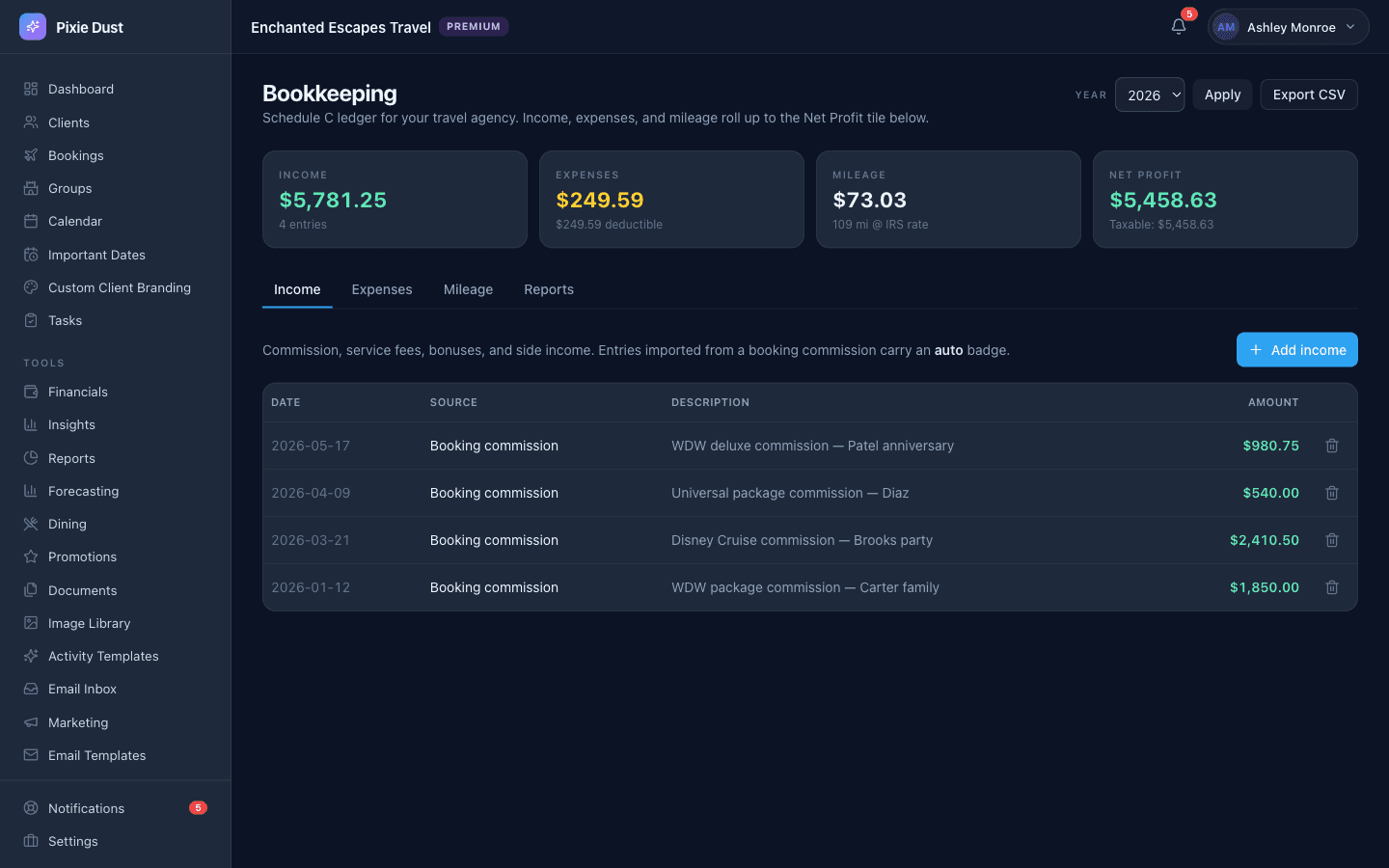
Income, expenses, mileage, and Schedule C net profit — commissions from bookings roll in automatically.
Per-Booking Financials That Update in Real Time
Every booking in Pixie Dust tracks the numbers that matter: total price, deposit paid, and balance due. No separate spreadsheet, no scribbled notes on a Post-it. It's all right there on the booking detail screen, and you can edit it anytime things change.
Commissions are auto-calculated based on the rates you've configured — so the moment you enter a booking total, you already know what you're earning. And here's the important part: your clients see total price, deposit, and balance when they check their trip details in the app. They never see your commission. That's your business, not theirs.
Commission Setup That Makes Sense
Available on the web app
Setting up your commissions shouldn't require an accounting degree. In Pixie Dust, you set a default commission rate and you're done. That rate gets applied to every new booking automatically.
But we know it's not always that simple. Maybe you earn a different rate on Disney World packages than you do on cruises, or Universal bookings pay differently than all-inclusive resorts. That's why you can optionally set different commission rates per booking type. Disney World at 10%, cruises at 12%, Universal at 8% — whatever matches your actual agreements.
Once your rates are in, commissions are calculated on every booking based on its type and total. No manual spreadsheet math. No copy-pasting formulas. Just accurate numbers, every time, without you lifting a finger.
Your Financial Dashboard
Available on the web app
This is the page you'll probably check every morning with your coffee. Your financial dashboard gives you a real-time snapshot of your entire business — no digging, no calculating, just clear numbers that tell you exactly how things are going.
Think of it as your business health check. Are you on track this month? Which booking types are bringing in the most revenue? How much commission have you earned this quarter? The answers are all right there — no spreadsheet gymnastics required. Just open the dashboard and see your business health at a glance.
Tax Season Without the Panic
You know that sinking feeling when your accountant asks for your income numbers and you realize you haven't updated your spreadsheet since March? Yeah, that's over now.
Because every booking's financials are tracked as you go, your numbers are always up to date. All your revenue, all your commissions, all your deposits and balances — living in one place, organized and accurate, every single day of the year.
No more reconciling three different spreadsheets at year-end. No more guessing what you earned on that cruise booking from July. Your data is export-ready whenever you need it — hand it to your accountant and get on with your life.
Know your commission earned across all booking types instantly. Disney, cruises, Universal, all-inclusives — it's all broken down and waiting for you. Tax season goes from a week-long headache to a five-minute task.
Frequently Asked Questions
Does Pixie Dust CRM calculate commissions automatically?
Yes. Once you set your default commission rate (and optionally, rates per booking type), commissions are calculated automatically every time you enter or update a booking total. You never have to do the math yourself.
Can I set different commission rates for different booking types?
Absolutely. You can set a default rate that applies to all bookings, then override it for specific booking types like Disney World, cruises, all-inclusive resorts, or Universal. Each booking uses the rate that matches its type, so your numbers are always accurate.
Can I export financial data for my accountant?
Your financial dashboard keeps all your revenue, commissions, deposits, and balances organized and up to date throughout the year. The data is export-ready, so when tax season comes around you can hand your accountant exactly what they need without scrambling through spreadsheets.
Do my clients see my commission amounts?
Never. Your clients can see their booking total, deposit paid, and balance due when they check their trip details in the app — but your commission rate and commission earned are completely hidden from the client view. That information is yours alone.
Does the financial dashboard update in real time?
Yes. Every time you create or update a booking’s financials, your dashboard reflects the change immediately. Total revenue, deposits recorded, balance due, and commission earned are always current — no manual refresh or recalculation needed.
Thirty days. No card.
From $10/month for solo agents, with per-seat plans for host agencies. Your clients get the trip app free.