Client Management
Know Every Client Like They're Your Only Client
Most travel agents are juggling client info across spreadsheets, sticky notes, email threads, and maybe a notebook from 2019. Pixie Dust gives you a real system — one place for every detail, every preference, every trip — so nothing slips through the cracks.
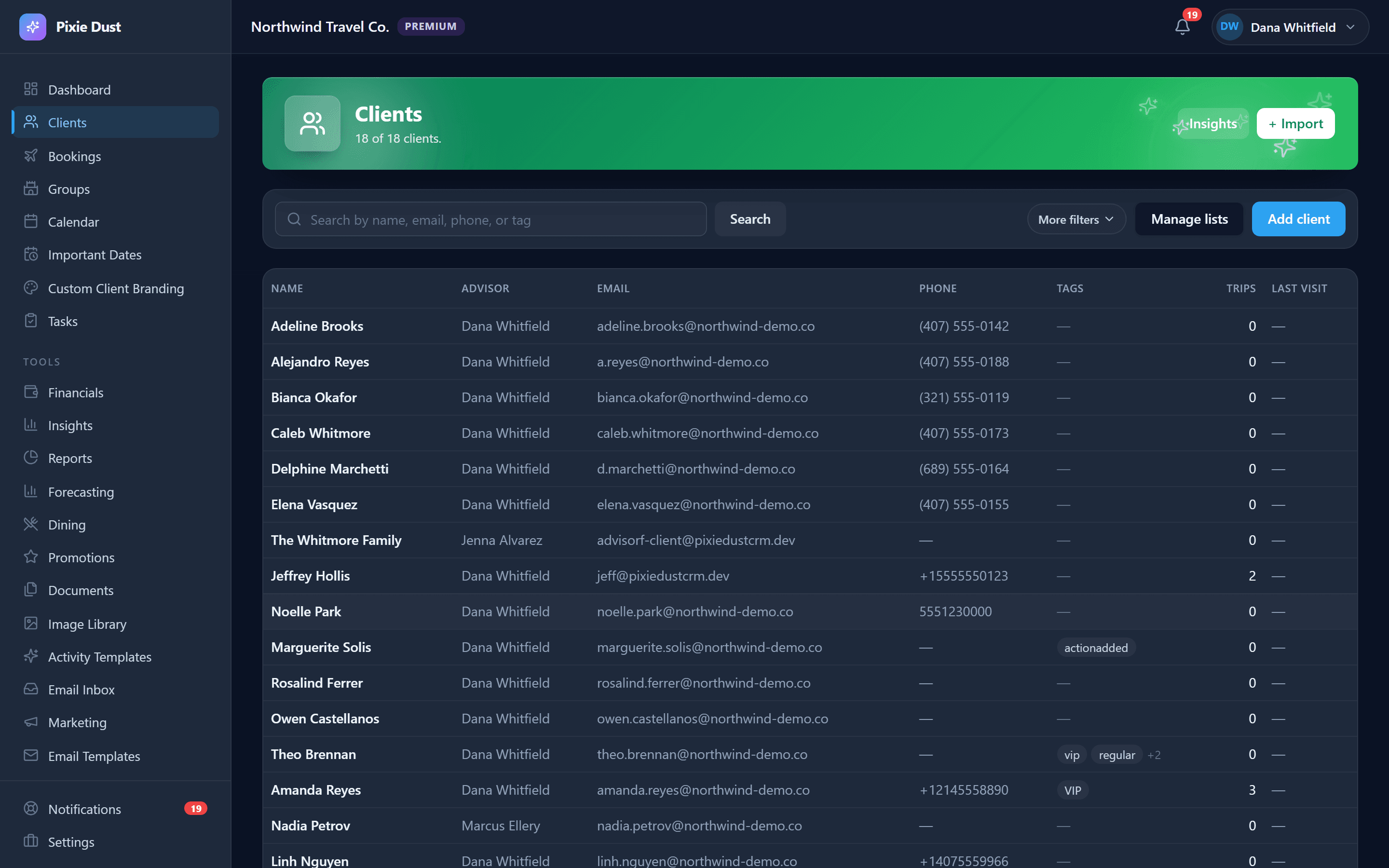
Everything About Your Clients, One Tap Away
Every client gets a full profile — not just a name and email in a row on a spreadsheet. We're talking the stuff that actually matters when you're planning a Disney vacation or booking a cruise.
Birthdays, anniversaries, which parks they love, who has food allergies, whether they've done Disney Cruise Line before — all of it lives in one place, ready the moment you need it.
Adding clients is flexible too. Create profiles manually when you're on the phone with someone, let them come in automatically from your quote form submissions, or bulk import your entire client list from Google Sheets. However your database lives today, we'll help you bring it home.
Invite Codes That Actually Work
Here's how client onboarding usually goes: you email a PDF, the client loses it, you resend it, they save it to some random folder, and three weeks later they're texting you asking for the confirmation number. Sound familiar?
With Pixie Dust, you generate a unique 6-character invite code for each client — right from their profile. That's it. One code.
Your client downloads the Pixie Dust app, enters the code along with their email and a password, and they're in. Their account is instantly linked to yours. They can see all their trips, itineraries, documents, and messages — no digging through email, no asking you to resend anything.
It takes about 30 seconds and it makes you look incredibly professional. Your clients get a branded app experience, and you stop fielding "can you send that again?" messages for good.
Tags, Segments, and Smart Lists
Available on the web app
Once your client list grows past a handful of families, you need a way to organize. Tags let you label clients however makes sense for your business — VIP, First-Timer, Repeat Client, DVC Member, Cruise Fan, whatever you need.
Smart Lists take it further. They're saved filters that pull up exactly the group you're looking for in one click. Want to see all your VIP clients who haven't booked in six months? That's a Smart List. All first-time Disney families with trips in the next 90 days? Another Smart List.
Use them for targeted follow-up, seasonal re-engagement, or just to keep your head straight when you're managing dozens (or hundreds) of clients. Tags and Smart Lists turn your client database from a flat list into something you can actually work with.
Client Insights That Drive Revenue
Available on the web app
Not all clients are the same — and your CRM should reflect that. Pixie Dust automatically assigns client tiers based on lifetime booking value: Platinum, Gold, Silver, and Bronze. You don't have to set this up or do any math. It just works.
You'll also see an at-risk indicator that flags clients who haven't booked in a while. It's a gentle nudge — sometimes all it takes is a quick "Hey, thinking about your next trip?" message to bring someone back.
Together, tiers and at-risk flags help you prioritize your time. Spend energy where it counts — nurturing your best clients and re-engaging the ones who might be slipping away. It's the kind of insight that turns a good agent into a great one.
Frequently Asked Questions
How do I import my existing client list?
You can bulk import your entire client database from a Google Sheets spreadsheet. Just format your sheet with the standard columns — name, email, phone, and any other details you have — and Pixie Dust will map and import them in one step. You can also add clients manually one at a time, or let them flow in automatically from quote form submissions.
Can clients update their own profile information?
Not directly. Client profiles are managed by you, the agent, to ensure data accuracy and consistency. However, clients can communicate updates through in-app messaging, and you can quickly make changes from your dashboard or mobile app.
How do client tiers work?
Client tiers — Platinum, Gold, Silver, and Bronze — are automatically assigned based on lifetime booking value. You don’t need to configure anything. As your clients book more trips, their tier updates automatically, helping you identify your highest-value relationships at a glance.
Is there a limit on the number of clients I can have?
No. Every Pixie Dust CRM plan supports unlimited clients. Whether you’re managing 10 families or 1,000, there’s no cap on how many client profiles you can create.
Can I tag clients and create smart lists?
Yes — on the web app you can add custom tags to any client (like VIP, First-Timer, DVC Member, or Cruise Fan) and then create Smart Lists that filter by those tags and other criteria. Smart Lists are saved filters you can revisit anytime, making it easy to target specific groups for follow-up or seasonal outreach.
Thirty days. No card.
From $10/month for solo agents, with per-seat plans for host agencies. Your clients get the trip app free.