Pro & Premium Host Agency
Close out every commission check in minutes.
Reconcile supplier checks against your bookings line by line, flag short-pays, accept adjustments, and pay advisors what they actually earned — without a single spreadsheet. Built for host agencies running on Disney, Universal, and cruise commissions.
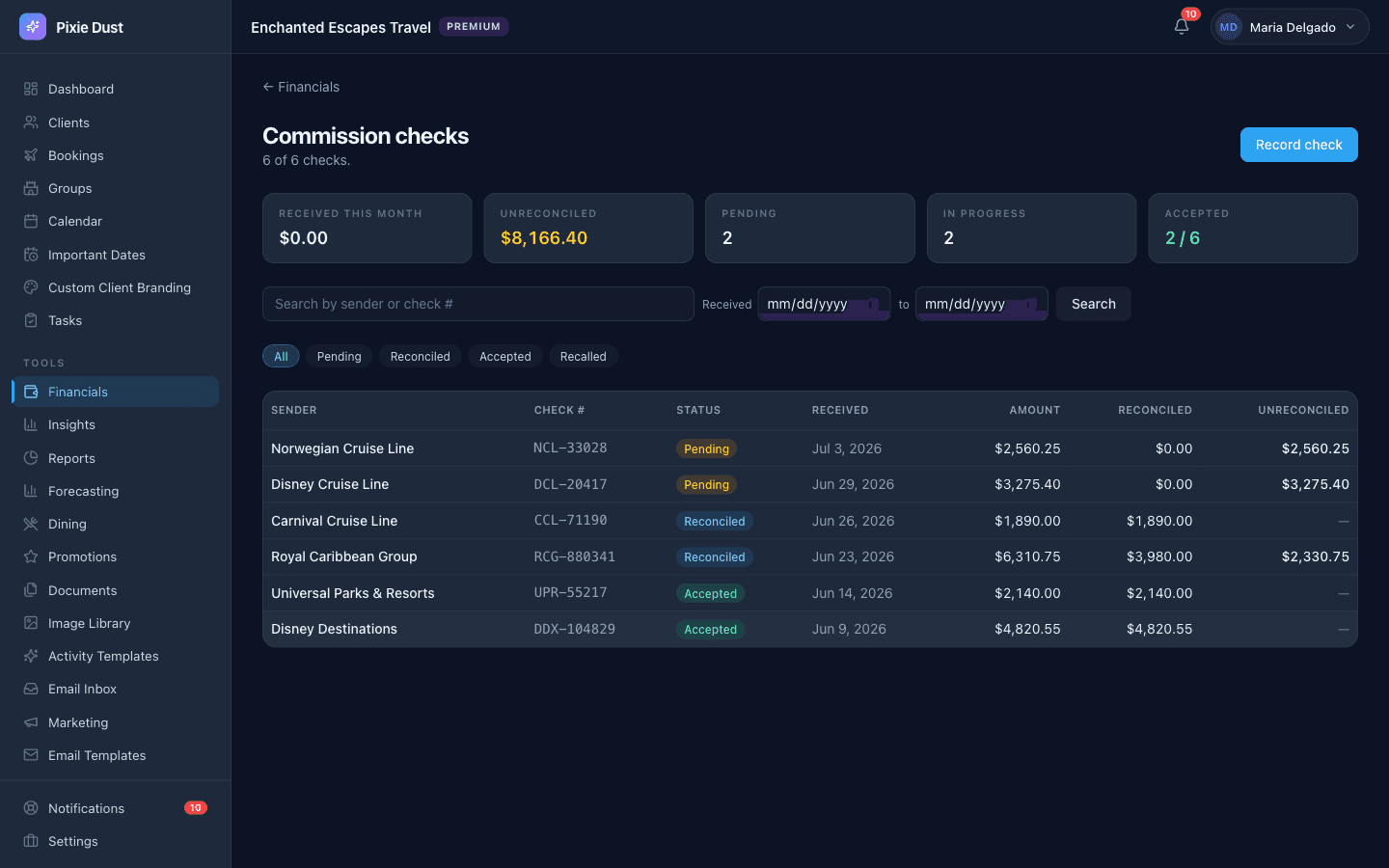
Every supplier check, its status, and exactly what is still unreconciled — at a glance.
The check arrived
The check came in. Now the work begins.
Disney sends a single check for forty bookings. Royal Caribbean sends one for twenty-seven. Universal pays weeks after the trip wrapped. Your job is to match each line on the statement to the booking it is for, decide whether it is the amount you expected, and work out what every advisor is owed.
Most host agencies do this in Excel. It takes hours, mistakes compound, and advisors get paid late. This collapses the whole workflow into one screen that already knows every booking in your CRM.
01
Log the check
When a supplier check arrives, open the Commission Reconciliation screen and enter the basics: supplier name, check number, check date, gross amount. That is it for setup — the system already knows which bookings are eligible to be paid out from this supplier.
Each check carries its own status: pending, reconciled, accepted, or recalled. So if a supplier ever sends a follow-up correction, you have full history of what was reconciled when.
02
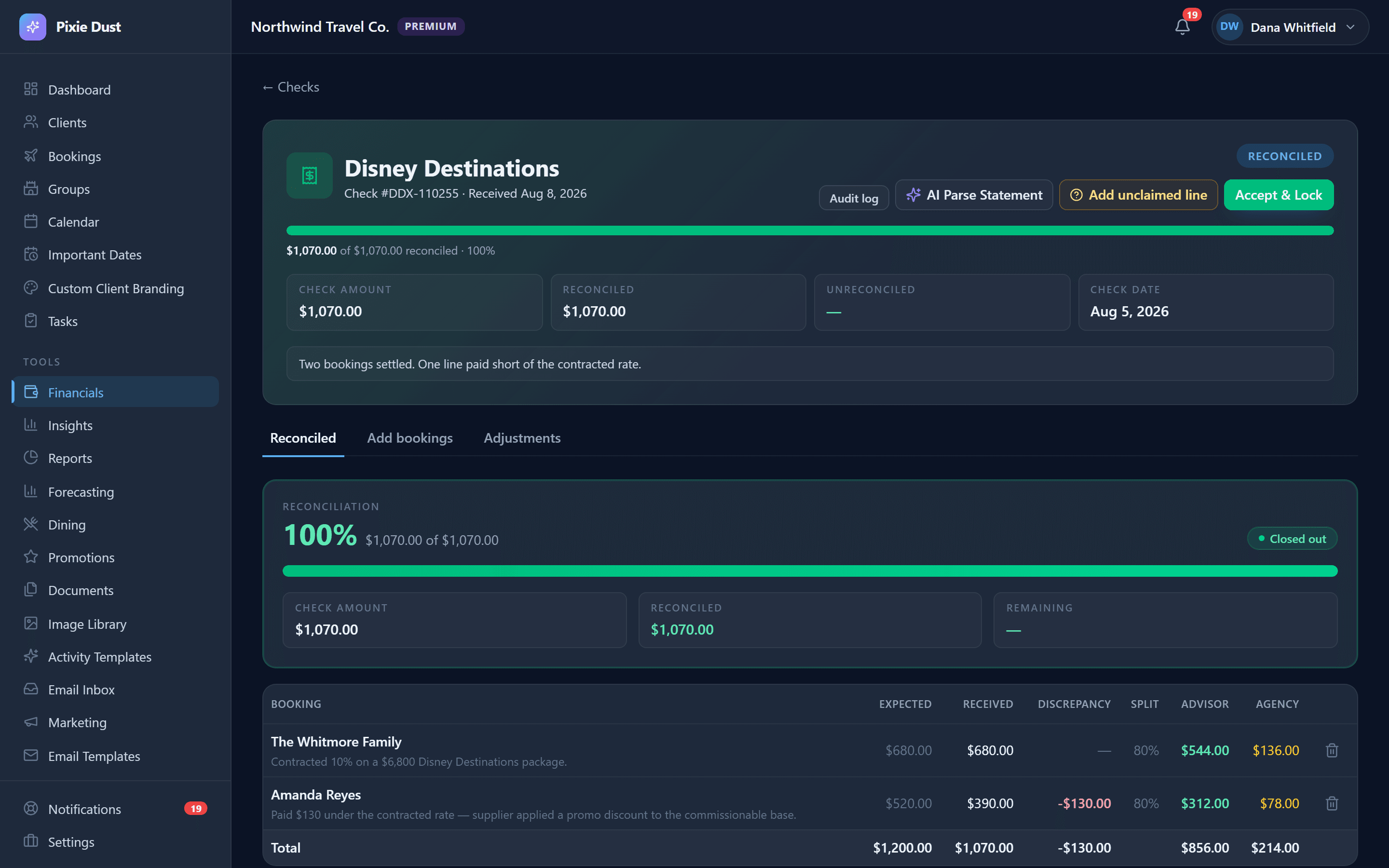
Reconcile line by line
The screen lists every booking you expected this supplier to pay for. For each line it shows the expected commission, calculated from the booking, beside a field where you enter what actually landed on this check.
Match? Accept and move on. Short-pay? The system flags the variance and lets you either accept it as the new actual or open an adjustment line item to chase the supplier for the difference.
Over time the variance flags become a quality signal: which suppliers consistently short-pay, which advisors' bookings show unusual deltas, and which destinations deserve another look at how you quote commission.
03
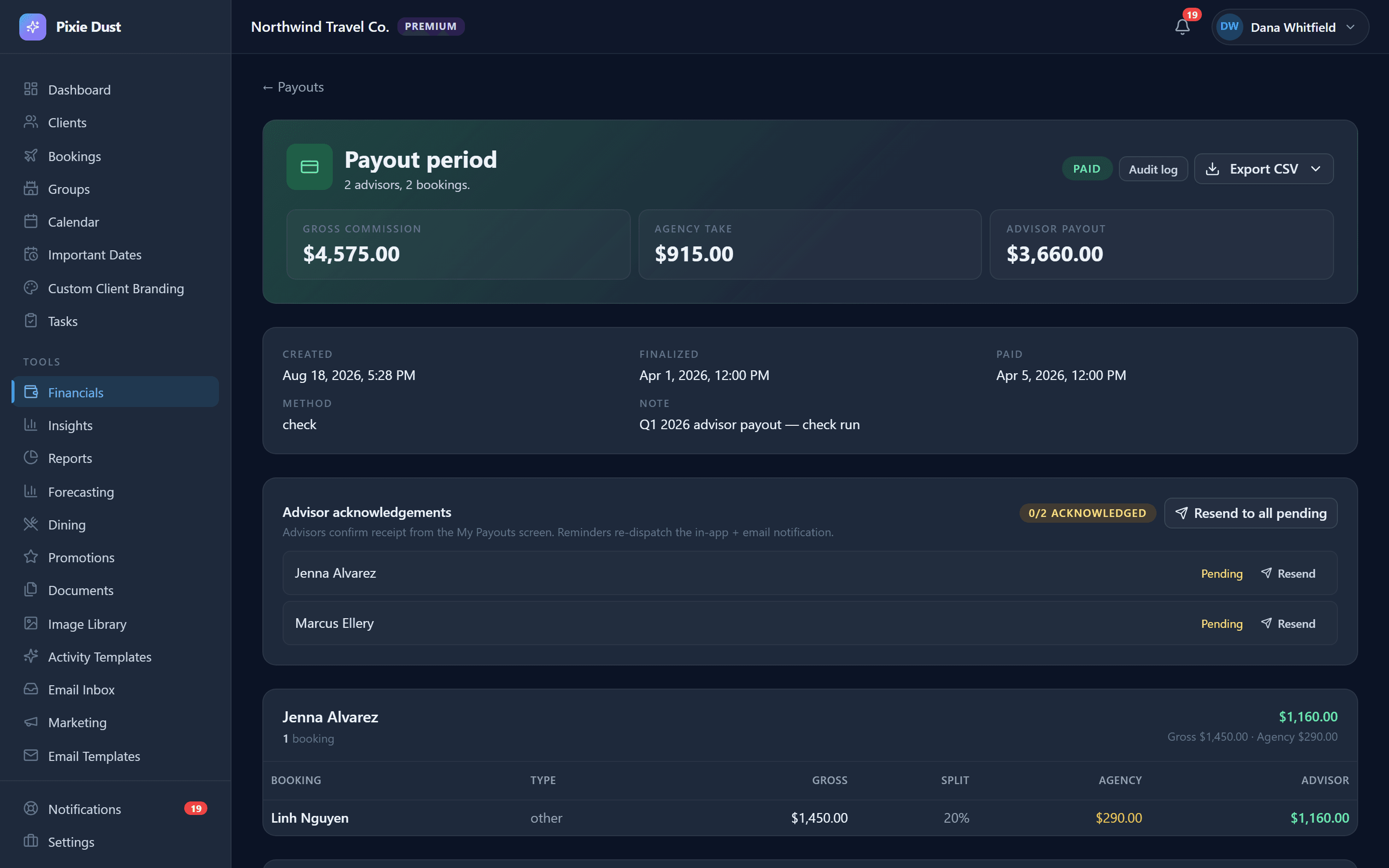
Pay advisors what they earned
Once a check is fully reconciled the system computes each advisor's share from the amount actually paid — not the originally projected figure. The payout report shows what they earned on this check, this month, this quarter, and year to date.
Export it to CSV for your bookkeeping tool, or generate 1099-NEC ready summaries at year end. Advisors get paid on what landed in the agency account, and you stop being the bottleneck.
Stop reconciling commissions in Excel.
Start your Host Agency planPro Host Agency from $30/seat/month · no long-term contract
Reports that actually help
Three views, one button each.
Each exports to CSV in one click. Tax-time exports include advisor-level subtotals formatted for 1099-NEC preparation.
Projected Income
What you expect to receive from open bookings, broken out by supplier and travel date.
Commission Earned
What you have actually been paid, filterable by date range.
Past Due
Trips that completed but have not been paid out yet. Hand this list to whoever chases suppliers.
Questions
Before you ask.
- Who can access commission reconciliation?
- It is included on Pro and Premium Host Agency plans, and available to agency owners and managers — the people who actually close checks — not to individual advisors. Advisors see their own payouts on the standard commission dashboard.
- Do I need to import my supplier statements?
- No. The reconciliation screen already knows which bookings are eligible for each supplier because you tracked them in the CRM. You enter the check total and reconcile line by line against the bookings already in your system.
- What happens if a supplier sends a follow-up correction?
- Open the original check, recall it, edit the affected line items, and re-accept. The full history is preserved — every advisor payout calculation references the version of the check that was active when it was generated, so corrections don't silently rewrite history.
- Can advisors see their reconciliation status?
- Advisors don't see the agency's reconciliation workspace, but their own payout dashboard reflects what has been finalized. Once a check is accepted, advisors see updated earnings tied to those bookings.
- Is this different from regular commission tracking?
- Yes. Every plan tier includes per-booking commission tracking — the projected amount you expect to earn on each trip. Reconciliation is the next step: matching that projection against the actual supplier checks that arrive weeks or months after the trip. Most agencies do this in Excel today.
- Will this work for cruise commissions paid weeks after sailing?
- Yes. Each booking carries a travel-end date and a projected commission. When the cruise line check lands months later, you reconcile against those bookings using whatever lookup the supplier provides — PNR, booking number, client name, whatever is on the statement.
Close the next check in minutes.
Pro Host Agency starts at $30/seat/month, billed per seat — monthly or yearly (save 20%). No long-term contract, cancel anytime.